Everest 2016: Expedition Communication Gear – Updated June 2018
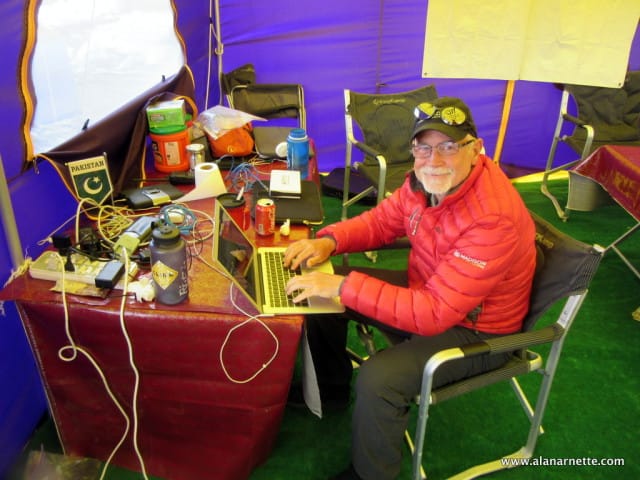
Alan blogging on K2

Updated June 2018 As the Everest 2016 season approaches, many climbers are researching how to stay in touch with loved ones back home. This post takes a brief look at the options. While staying in touch is mandatory and part of an expedition for me, some people want to get away from it all and escape the modern noise that comes with 24 by 7 communications. If that is your case, then take a sat phone for safety but don’t use it unless there is an emergency! Tell everyone that no news is good news and you will see them when you get home. And enjoy your time off the grid Call a Friend: Call a friend who passes it along or transcribes your conversation and posts on your Facebook page or blog Email an update to a friend who forwards it, posts on Facebook or cuts and pastes it to your blog Do it Yourself: Connect to Facebook, Twitter or Instagram via the Internet and directly post. Phone in a voicemail through a service that posts it directly to your blog Send an email that automatically posts to your WordPress Blog Write a post and upload it using the Internet along with pictures and/or videos directly to your blog There are many ways to do this communication but I will cover what I have been doing for over 15 years. I have learned a lot and stick with what works – for me. I do all the programming but I am not THAT technical. There are consultants who you can hire at $150 an hour to do the work for you. I started with “Call a Friend” (my wife managed the transcription much to her chagrin) but soon switched to a fully automated system. The minimum setup you need is a phone, either satellite or cell depending on where you go and what service is available. For more sophisticated and independent postings you need to add a computer of some type, a digital camera and an Internet connection. This will enable you to connect with software that is linked to a website which may include a Blog, WordPress for example. If this sounds confusing, it is and it is not. So let’s break it down. Websites The first decision to make is where do you want followers to follow you – Facebook, Twitter, your own Blog or a dedicated website – or a combination of all of these. Also, is this a one time event or something you want to build over time. For a one time expedition, using Facebook is easy but limited over what you can control and present. A dedicated Blog, WordPress or Blogger for example, gives you significant control over how you present your information plus you can add links and pages for more information, causes or other sites. A dedicated website is the best choice if you want full control over look and feel to build a long term destination for family and friends to follow your adventures for years to come. But all this comes with a bit more work. Don’t get overwhelmed with all these choices, it is actually much simpler than you think. COMMUNICATIONS This is the crux of your dispatch plan. You have two basic choices: Phones or satellite modems. Again, one step at a time. For phones, there are cell phones and/or satellite phones using networks from Iridium or Thuraya depending on where you are climbing. A combination of phones sometimes might be in order. Iridium vs Thuraya Satellite Phones I always suggest bringing a sat phone since cell service is not reliable in remote mountain areas even though it may be in the local mountain gateway city. I feel there are only two satellite systems to consider: Thuraya which is best for Asia, Africa and Europe and Iridium for North and South America, the oceans and the poles. Iridium phones are significantly more expensive than a comparable Thuraya handset. Thuraya and Iridium hotspots with bluetooth connections to a smartphone making your phone book and apps easily accessible. But this could be expensive since many social media apps like Facebook and Twitter stream data thus taking a long time and costing a lot of money just to see a picture of what your friend had for lunch! Thuraya is the best choice for data if you are climbing in their coverage area (which includes Everest) because once you lock onto a satellite you do not usually lose it whereas with Iridium you are switched between satellites as they move across your view and in my experience, you will lose the data connection during each switch most of the time, even though they tell you it will switch seamlessly. This lost connection limits your data uploads to a short few minutes preventing a dispatch with several images. If you lose your connection you must restart the upload process meaning lost time, money and sat time. The only time my Iridium connection was rock solid was on Kosciuszko’s summit where I had a 100% clear sky and unlimited visibility. Even in Antarctica, I could only connect for 4 minute periods before losing my data connection. To state the obvious, most mountainous areas rarely have unobstructed views of the sky, duh. Thuraya can be less expensive than Iridium on a per minute basis depending on location. For example calls to the US from Nepal or China cost US$0.90 using their NOVO SIM. The rate jumps to US1.85 from Pakistan. Iridium is a flat US$1.20 per minute from anywhere in the world. It might be less expensive over the long run to buy your satellite phone instead of renting it depending on how many trips you plan and how many minutes you will use. Usually renting a phone implies more expensive minutes but not always so shop around. Sat phones range from $800 to $1800 and rentals around $275 a month. Check eBAY for some good deals. Cell Phones Most guides bring an